Manage models and GPUs
Portal
Open Manage platform, then Models to manage deployments. The page has a Deployments tab, an External Models tab (the second for the connections to outside model providers), and the Model Aliases tab. Stopped deployments are left out of the Deployments list; select Show stopped models above the list to include them.
The tenant Models page lists what that tenant can use, on the same Deployments and External Models tabs.
Select By node to see GPU memory and model placement. Colors distinguish deployments, not deployment health.
Each GPU shows the memory that its deployments use, measured on NVIDIA GPUs, AMD GPUs and Intel GPUs that use
the xe driver. A GPU that has no measurement, such as a Tenstorrent device or an Intel GPU on the older i915
driver, shows its memory size with usage unavailable.
Intel GPUs are listed only after your administrator enables Intel support. The xpumd service on the node publishes the memory size of each Intel GPU. Without it, the GPUs are listed without their memory size. See the Intel prerequisites.
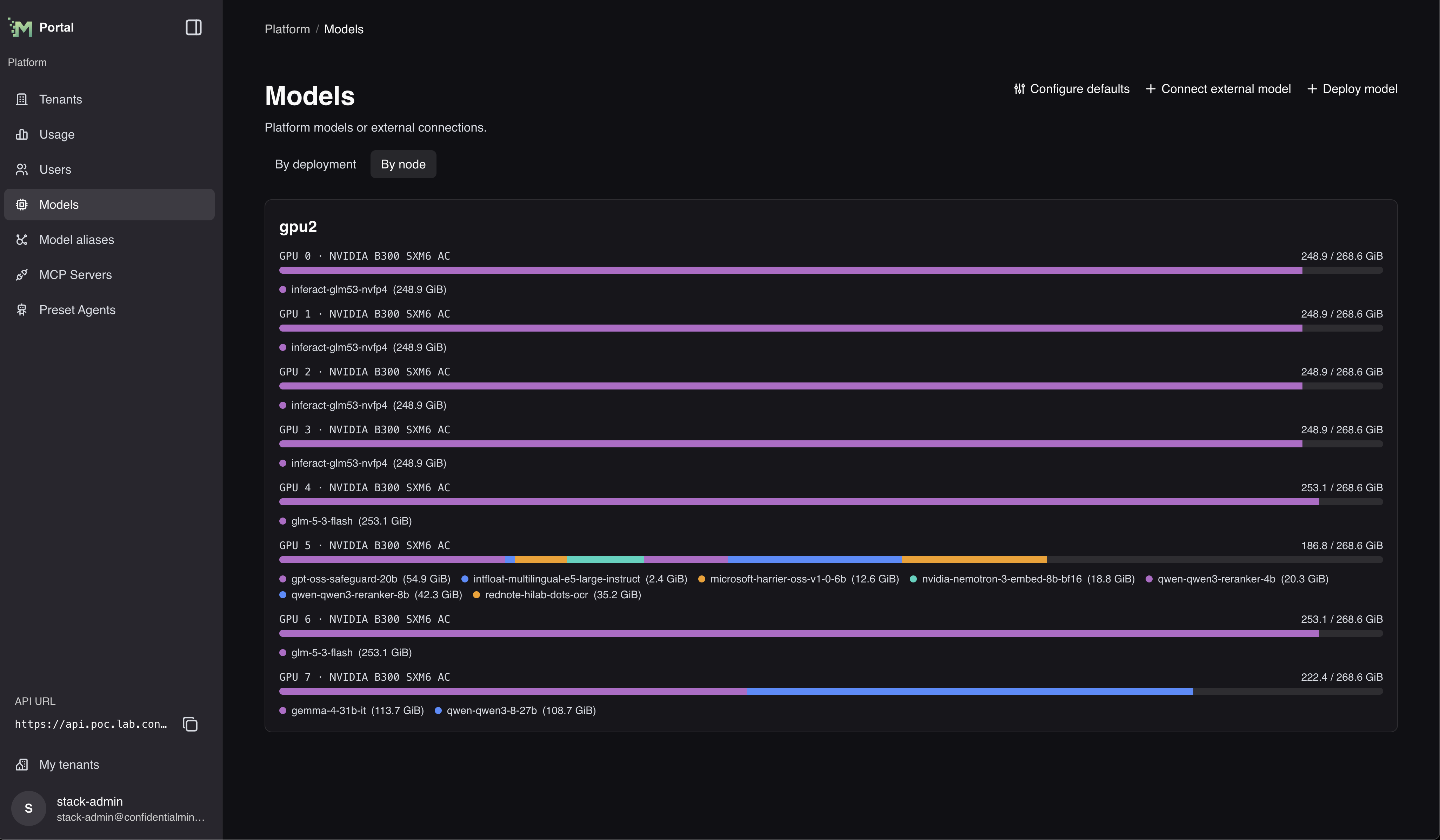
Select Configure defaults on the platform Models page to choose platform-wide defaults: the models new RAG endpoints start with, and the transcription model Chat uses for audio attachments.
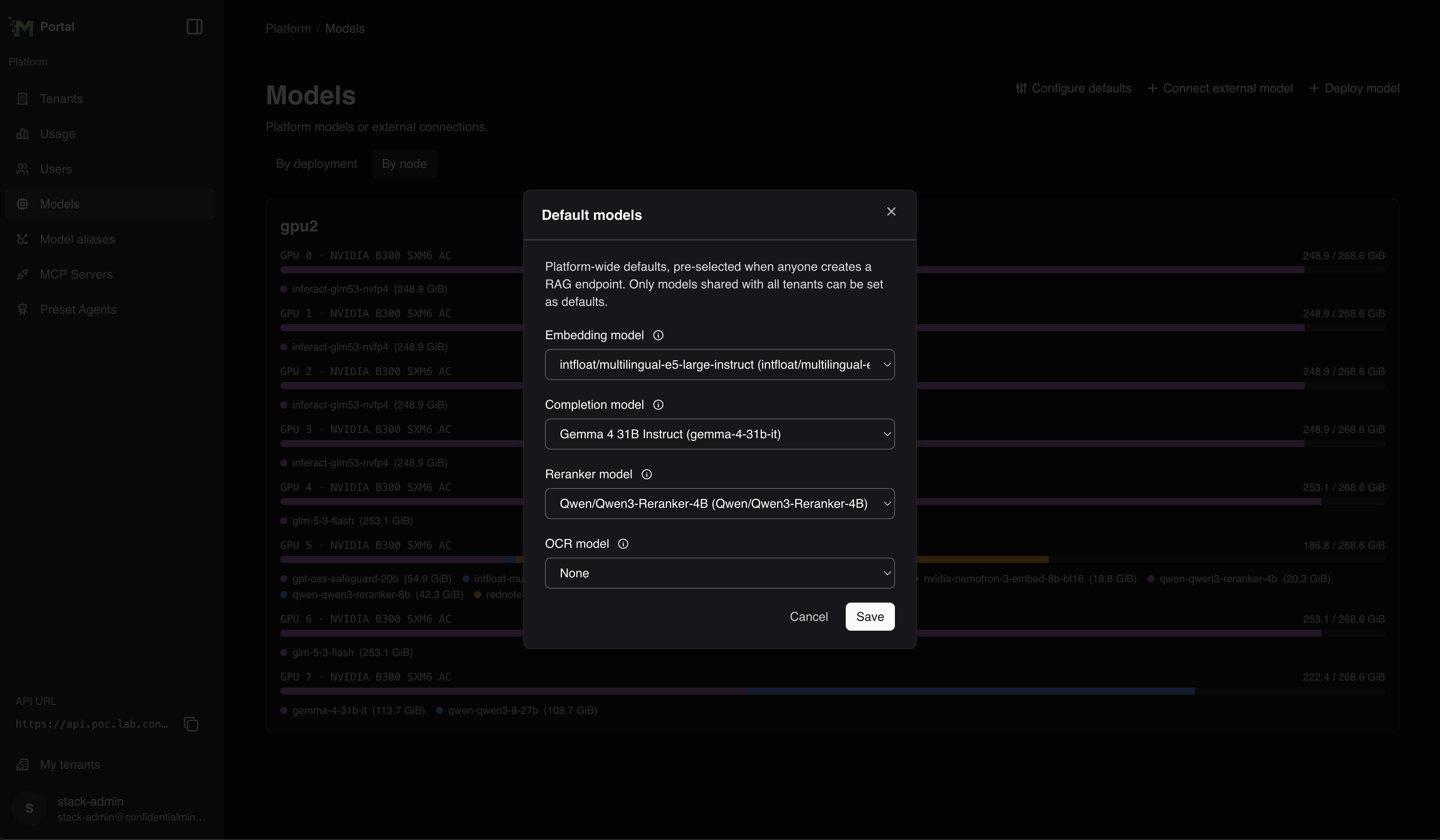 The dialog is titled Default models. Choose an Embedding model, Generation model, Reranker model, OCR model, and Transcription model, then select Save. The generation model is only needed by RAG endpoints that use contextual embeddings; leave it empty if none of them do. Only models that are shared with all tenants can be chosen, so a model that is not shared does not appear in these lists.
Stopped models are marked (stopped) and listed last in Default models. You can still select and save one as a default. When you create a RAG endpoint, a field stays empty if its platform default is stopped. Start the model from the Deployments tab before you use it.
Embedding prefixes
Set query_prefix through the model deployment or external-model API. Set the document prefix,
passage_prefix, through the model deployment API. External models have no document prefix. The portal
has no control for these settings. Values preserve newlines and trailing spaces. An empty string selects
no prefix.
New Hugging Face deployments use the defaults below when a field is omitted, including deployments
created through the portal. Matching uses the model family name regardless of publisher or letter case,
including size, quantization and fine-tune variants. Set an explicit prefix if a variant needs different
text. Other models remain unset.
Existing deployments are not changed. To give one a prefix, update it with query_prefix or
passage_prefix explicitly.
A deployment created before these defaults existed has no prefixes, so check it against the table below. For example,
RAG searches a Nemotron deployment without prefixes with its built-in E5 instruction and indexes documents without
the passage: prefix. Set the prefixes before a RAG endpoint that uses the model builds its index, since the
endpoint keeps the document prefix it recorded then.
E5, Qwen3 and Harrier use this retrieval instruction:
Instruct: Given a query, retrieve relevant passages that best answer the query
Query:
Include a trailing space after Query:. The model-specific input formats are:
| Embedding model | Query prefix | Document prefix |
|---|---|---|
| Multilingual E5 instruct | Two-line instruction above | None |
| Qwen3 Embedding | Two-line instruction above | None |
| Harrier OSS v1 | Two-line instruction above | None |
| GTE English v1.5 | Empty string, raw input | None |
| Nemotron 3 Embed | query: | passage: |
To update a model deployment, include query_prefix or passage_prefix in the update mask. An empty or
omitted value clears it without restoring the default. Leaving it out of the mask preserves the saved value.
For external models, omission preserves the value and an empty string clears it.
RAG endpoints take both prefixes from their embedding model, and changing either prefix restarts the endpoints that use the model. RAG applies the query prefix each time an endpoint starts. A model with no query prefix gets RAG's built-in E5 instruction. RAG records the document prefix when an endpoint builds a fresh index, so an endpoint that already has an index keeps its recorded document prefix.
External model context length
Most providers do not report how many tokens their model accepts in one request, so an external model's context length is not discovered automatically. You can record that limit yourself. The number counts both the prompt and the response.
On the Connect external model form, under Capabilities, enter the number of tokens in Context length. Leave the field empty if you do not know the limit. The connection is then created without one.
Enter a whole number above zero. Any other value shows a message under the field, and nothing is saved.
The field is not shown for transcription models or image generation models. Their input and output are not measured in tokens.
If you can manage the connection, its Capabilities card shows Context length. It reads Not set while no limit is saved.
To change the value later, open the connection from the External Models tab and select Edit on the Capabilities card. The field shows the saved value. Enter a new one and save it. Empty the field and save to remove the limit.
Through the external-model API, set max_model_len. On update, omission preserves the saved value and 0
clears it.
Changing the context length restarts every RAG endpoint that uses this external model as its embedding model. An endpoint cannot answer queries while it restarts, so wait until it is Ready again before you send requests.
The gateway model list reports the value as max_model_len. For model deployments it reports the context length
the operator observed from vLLM.
Web search on OpenAI models
Everyone you allow to invoke a model that the platform calls at OpenAI directly can also send web searches with that
model through the gateway's /v1/alpha/search endpoint. Codex CLI does this on the gpt-6.x models. The platform has
no setting that turns this off. OpenAI charges each search to the account behind the model's connection, in addition
to token costs. Searches do not appear in usage reports, and token quotas do not limit them. See
Web search on gpt-6.x models.
Troubleshooting
Common Issues
-
Insufficient VRAM:
- Stop an unused operator-managed model deployment to release its GPUs without deleting its configuration
- Reduce model size or precision
- Increase tensor parallelism
- Move other models to different GPUs
-
The GPU memory share is already taken:
- On an AMD or Intel GPU, the save fails with a message such as
AMD GPU "gpu-1-128" has 40% memory share free; this deployment asks for 50% - Lower GPU memory utilization (%) or the number of replicas so that the request fits the free share
- Stop a deployment that uses the GPU, or select a different GPU
- A deployment without a memory share counts as 90%. Give it a lower share to make room
- On an AMD or Intel GPU, the save fails with a message such as
-
Deployment Failures:
- Check GPU compatibility with model requirements
- Ensure selected node has sufficient resources
-
Long Startup or Repeated Restarts:
- Large custom models can take up to approximately 90 minutes to load before the startup health check times out
- Check the model server logs to confirm that weight or shard loading is progressing
- If the logs start over after approximately 90 minutes, verify the model arguments, available resources, and model compatibility
-
Performance Issues:
- Adjust batch size for your workload patterns
- Check for CPU bottlenecks in preprocessing
- Consider GPU bus bandwidth limitations when using multiple GPUs