Custom Deployment Restrictions
Overview
Custom deployment restrictions allow system administrators to control whether tenants can deploy services using custom container images and Helm charts. This feature provides security and governance by limiting deployments to pre-approved service templates only.
Key Concepts
What Gets Restricted
When restrictions are enabled, deployments must use configurations that match approved service templates. Custom values for the following fields are blocked:
- Container images (
deployment_image) - Helm chart versions (
chart_version) - Values files (
values_file) - Registry URLs (
custom_registry_url) - Chart URLs (
custom_chart_url)
Deployments with custom configurations not matching any approved template will be rejected with a clear error message.
Default Behavior
- Both new and existing tenants: Custom deployments are restricted by default
- Restriction Updates: Settings can only be modified by system administrators
- Model services: Not affected by this restriction
How It Works
Validation Process
When a user attempts to deploy a service:
- The system verifies if custom deployments are restricted for the tenant
- If restricted, it compares deployment settings with approved templates
- Rejects deployments using non-approved container images or Helm charts
- Shows an error message to the user if deployment is blocked
UI components for adjusting the restricted values similarly get hidden or disabled to prevent configuration
Using the Platform UI
Accessing Tenant Restrictions
System Administrators Only:
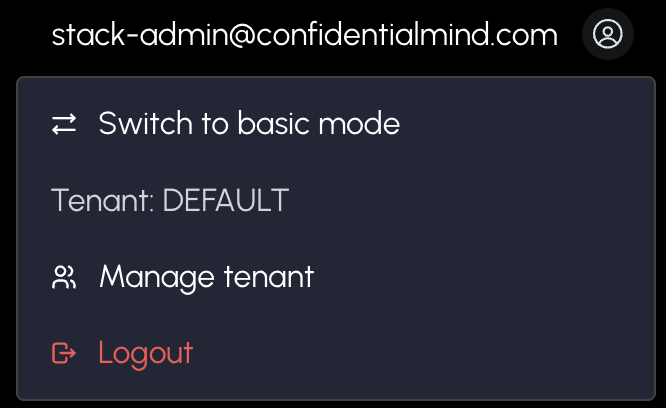
- Navigate to Tenant Admin Panel from the profile menu
- View all tenants in the Overview tab
Managing Restrictions
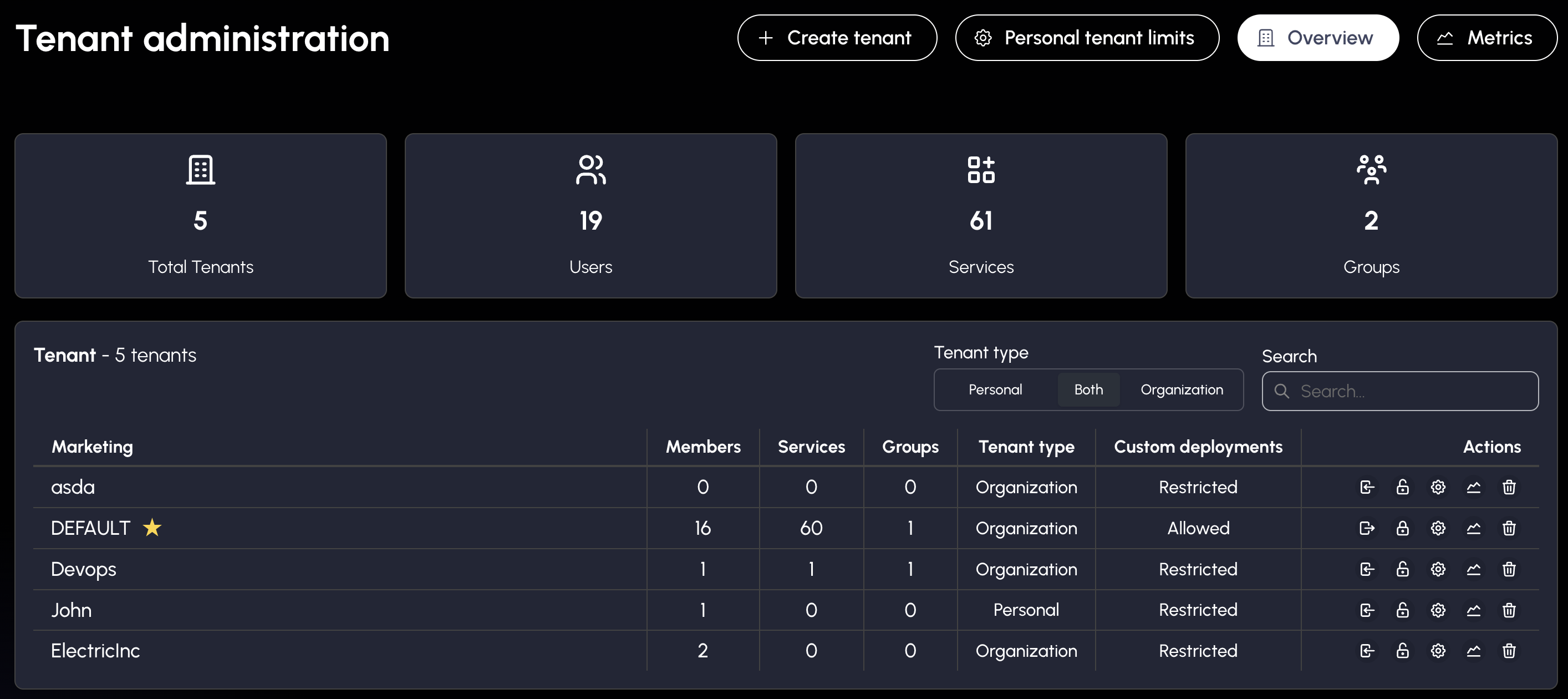
The tenant table displays the current restriction status for each tenant in the "Custom deployments" column:
- Restricted: Custom deployments are blocked (only approved templates allowed)
- Allowed: Custom deployments are permitted (users can specify custom images/charts)
To toggle the restriction setting:
- Locate the tenant in the table
- In the Actions column, click the lock icon:
- Lock icon (🔒): Click to restrict custom deployments (block custom images/charts)
- Unlock icon (🔓): Click to allow custom deployments
Changes take effect immediately for all new deployment attempts.
API Reference
Authentication & Authorization
All endpoints require tenant-admin permissions (system administrators only).
Get All Tenants Admin Endpoint
GET /v1/admin/manager/tenants/admin
Retrieve information for all tenants, including restriction settings.
Response:
{
  "tenants": [
    {
      "id": "b0212b74-deb1-4e12-9e61-0d67916816ec",
      "name": "engineering",
      "userCount": 5,
      "serviceCount": 12,
      "subgroupCount": 2,
      "isPersonal": false,
      "useDefaultLimits": true,
      "restrictCustomDeployments": true
    },
    {
      "id": "59d3a188-8f22-45a5-a2fd-dc98ec16c38e",
      "name": "research",
      "userCount": 3,
      "serviceCount": 8,
      "subgroupCount": 0,
      "isPersonal": false,
      "useDefaultLimits": true,
      "restrictCustomDeployments": false
    }
  ],
  "uniqueUsers": 8
}
Field Descriptions:
tenants: Array of tenant information objectsid: Tenant UUIDname: Tenant nameuserCount: Number of users in the tenantserviceCount: Number of services deployed in the tenantsubgroupCount: Number of subgroups within the tenantisPersonal: Whether this is a personal tenant (created by a single user)useDefaultLimits: Whether the tenant uses default resource limitsrestrictCustomDeployments: Whentrue, custom deployments are blocked for this tenantuniqueUsers: Total number of unique users across all tenants
Get User Tenant Information Endpoint
GET /v1/admin/manager/tenants
Returns the current user's tenant memberships.
Response:
{
  "tenants": [
    {
      "id": "b0212b74-deb1-4e12-9e61-0d67916816ec",
      "name": "engineering",
      "path": "/tenants/engineering",
      "isAdmin": true,
      "scopes": ["view", "admin"],
      "restrictCustomDeployments": true
    }
  ],
  "pendingInvites": []
}
Update Tenant Restrictions Endpoint
PATCH /v1/admin/manager/tenants/:tenantId/restrictions
Update custom deployment restriction setting for a specific tenant.
Path Parameters:
tenantId(required): Tenant ID
Request Body:
{
  "restrictCustomDeployments": false
}
Field Descriptions:
restrictCustomDeployments(required, boolean):true: Block custom deploymentsfalse: Allow custom deployments
Response:
{
  "success": true,
  "message": "Tenant restrictions updated successfully",
  "restrict_custom_deployments": false
}
Usage Examples
Check if tenant allows custom deployments:
GET /v1/admin/manager/tenants/admin
# Look for restrictCustomDeployments field in tenant objects
Enable custom deployments for a tenant:
PATCH /v1/admin/manager/tenants/{tenant_id}/restrictions
{
  "restrictCustomDeployments": false
}
Disable custom deployments for a tenant (enforce template-only):
PATCH /v1/admin/manager/tenants/{tenant_id}/restrictions
{
  "restrictCustomDeployments": true
}
Use Cases
Secure Multi-Tenant Environment
Organizations hosting multiple client tenants can restrict custom deployments to:
- Prevent deployment of unvetted container images
- Enforce security scanning and approval workflows
- Maintain consistent deployment configurations
- Reduce security risks from user-supplied containers
Development vs Production Tenants
Different restriction levels for different environments:
- Development tenants: Allow custom deployments (
restrictCustomDeployments: false) - Production tenants: Restrict to approved templates (
restrictCustomDeployments: true)
Compliance Requirements
Industries with strict compliance requirements can:
- Ensure all deployed containers come from approved registries
- Maintain audit trails of approved templates
- Prevent unauthorized software deployment